Library Desk Scheduling Software
Edit the schedule from any browser and staff see the change instantly. Recurring shifts repeat on their own and skip the days you're closed. Unlimited staff, volunteers, and branches for one annual price.
Free 30-day pilot · No credit card · Export your data anytime
Already have an account? Log in
You earned a master's in library science. Not a master's in scheduling management. Yet here you are, rebuilding the same spreadsheet every month on the one machine that can edit it, fielding “wait, am I working Thursday?” all week, and keeping track in your head of who's over hours, who's trained for the desk, and who swapped with whom.
Start where you are.
What changes depends on what you use today. Pick the page that sounds like your library.
Coming from Schedule3W?
See how Kickstool compares, feature by feature, and what switching involves.
Read moreComing from LibStaffer?
A side-by-side look at pricing, volunteers, and day-to-day scheduling.
Read moreScheduling in a spreadsheet?
What changes when the schedule stops living in one file on one machine.
Read moreTracking volunteer hours?
Get the totals that grant applications and board reports keep asking for.
Read moreWorking out off-desk time?
How libraries decide desk and off-desk hours, and how to keep it fair.
Read moreNot ready for software?
Start with the free schedule template. It works on its own, no account needed.
Read moreBuild the whole week on one screen.
Not a dated spreadsheet you have to decode. People down the side, the week across the top, every shift in its place. Flip to Service points to read the same week by desk — and spot the desks nobody's covering yet.
The parts you'll feel in week one.
What replaces the monthly spreadsheet rebuild, and the “who's covering?” texts that come with it.
Run the schedule from your phone
Kickstool is a real web app, not a desktop program with a read-only website bolted on. Check who's on the desk right now, move a shift, or approve time off from your car or a conference hotel, and everyone sees the change right away.
- No install: works on any phone, tablet, or browser
- Today's board, live, with who's on right now
- Edits go live the moment you save
Their shifts, in the calendar they already use
Each person subscribes once, and their shifts land in Google, Outlook, or Apple Calendar and keep updating as the schedule changes. No app to open, no screenshot to text around. Everyone also gets a login that shows just their own schedule. When the whole schedule needs to be out in the open, share one read-only link: post it in the staff room, send it to a partner organization, or hand it to a sub. No login required.
- Subscribe once: shifts sync to Google, Outlook, or Apple Calendar
- Changes flow through on their own, with no stale copies to re-send
- Prefer email? A weekly summary of upcoming shifts, on by default and easy to turn off
- Share a read-only schedule link, branded and printable
- Replace any link if it travels too far
9:00 AM – 1:00 PM
Information Desk
2:00 PM – 6:00 PM
Circulation
10:00 AM – 2:00 PM
Children's
kickstool.com/api/schedule/f8a2b9c1…Build the week once. It repeats itself.
Lay out your recurring pattern once. It repeats on the cadence you set, from weekly to every other week to monthly, and skips the days you're closed. Any single shift can still be changed as a one-off, so you never retype the schedule.
- Daily, weekly, biweekly, monthly, or custom patterns
- Skips the days you mark closed
- Edit any single shift without breaking future patterns
- Optional lunch breaks and desk-time rules that warn, never block
Repeats
Every other Tuesday, 9 AM – 1 PM · skips closures · until Aug 30
Split a day across desks by dragging, not typing
People rarely sit at one desk all day. Maybe it's the Info Desk until noon, Shelving until two, then an outreach visit. Lay the whole shift on a single bar where each block is a desk: drag a block to move it, pull an edge to resize it. Blocks snap to fifteen-minute marks, so there's no stack of start-and-end dropdowns.
- Drag colored blocks to move them, pull the edges to resize
- Overlaps stack into their own lanes and turn red, so a double-booking can't slip past you
- "Add desk" adds the next unused desk and finds it an open slot
- "Even split" divides the shift evenly across every desk in one click
Info Desk
9a–12p
Shelving
12–2p
Outreach
2–5p
Drag a block to move it, or its edges to resize. Snaps to 15 minutes.
Drag a shift onto someone else's row. Done.
Day view gives each person a row on a shared timeline. Grab Deshawn's shift and drop it on Priya's row, and it's reassigned: no dialog, no dropdown, and new times if you drop it somewhere new. Drag an edge to resize a shift, or drag across an empty stretch of a row to create one. If a drop would double-book a desk, you get a heads-up and a simple choice: bump the other assignment, or keep both.
- Drag a shift to move it, drag an edge to resize, drag on empty space to create one
- Drop it on someone else's row to reassign it; it saves the moment you let go
- Desk conflicts get flagged inline: Bump or Keep both, your call
- The week grid is still there for a quick look, and Day view is one click away from any date header
Drag a shift onto another row to hand it off. Release to save — no dialog, no dropdown.
See what's covered at a glance
Set how many people each desk needs, and every desk reads green, amber, or red: covered, thin, or empty. It's checked hour by hour, so a desk that's only staffed until 1:30 doesn't pass as covered. Every gap is a button, too: click it and the shift form opens with the desk and hours filled in, plus a list of who's free.
- Per-desk, per-hour coverage: covered, understaffed, uncovered
- Click a gap to fill it — desk and times arrive pre-filled
- Ask for cover on a single desk assignment instead of the whole shift
- Warns on double-bookings, PTO conflicts, and training mismatches
- Admins get an email digest of the coming week's gaps and pending requests, daily or weekly
The numbers your board keeps asking for
Volunteer hours for the grant application. PTO used. And the desk-time balance: each person's desk and off-desk hours against what's expected, so “who's on desk how much” is something everyone can see, not something one person remembers. Export any of it to CSV in a couple of clicks.
- Volunteer and staff hour totals, grant-ready
- Desk vs. off-desk balance per person — fairness you can point at
- Break down by person, assignment, or date range
- Export everything to CSV anytime; nothing is trapped
Everything your library needs. Nothing it doesn't.
Modeled on how libraries actually run: service points, volunteers, outreach, and the recurring rhythm of an open week.
Service point scheduling
Reference, circulation, the children's desk: every service point your library runs, in one schedule instead of a separate sheet for each.
Shift filling that does the busywork
Recurring shifts build the week on their own. When an hour goes uncovered, it becomes a button: click it and the shift form opens with the desk and time filled in, and the people who are free and trained listed first. Need to move or hand off a shift instead? Drag it in Day view.
Shift swaps without email chains
Staff post a shift they can't work or claim an open one from their phone, and you approve with a tap. No group text, no reply-all.
Calendar sync
Subscribe once and shifts appear in Google, Outlook, or Apple Calendar, and they keep updating as the schedule changes. Nothing to re-export.
Student workers & volunteers
Give part-timers, students, and volunteers their own hour limits and availability, and see the moment someone goes over.
Every branch, one account
Each location keeps its own hours and schedule. Managers edit the branches they run and can still see the others to coordinate.
Scheduling more than one location?
Multi-branch scheduling
Someone calls out at Riverside. Before you ask Central to lend a person, check what’s already on Central’s schedule.
Kickstool gives each location its own opening hours and schedule, with a clear view of who’s working where. Managers build the schedules for their own branches and look across locations when they need to coordinate.
- Start with the branches you manage
- Your own locations come first. Change the filter when you need the wider view.
- Share the scheduling responsibility
- When you invite a manager, choose which branches they can edit. The rest stay visible so everyone can coordinate.
- See where shared staff are working
- When someone works at more than one location, each piece of their day appears under its branch. Open the shift to see the whole day.
- Keep your "Today" view easy to scan
- Collapse the locations you don’t need right now. Head counts, coverage summaries, and closure notices stay visible.
Only one location? Your schedule keeps its simpler layout.
See how scheduling across branches works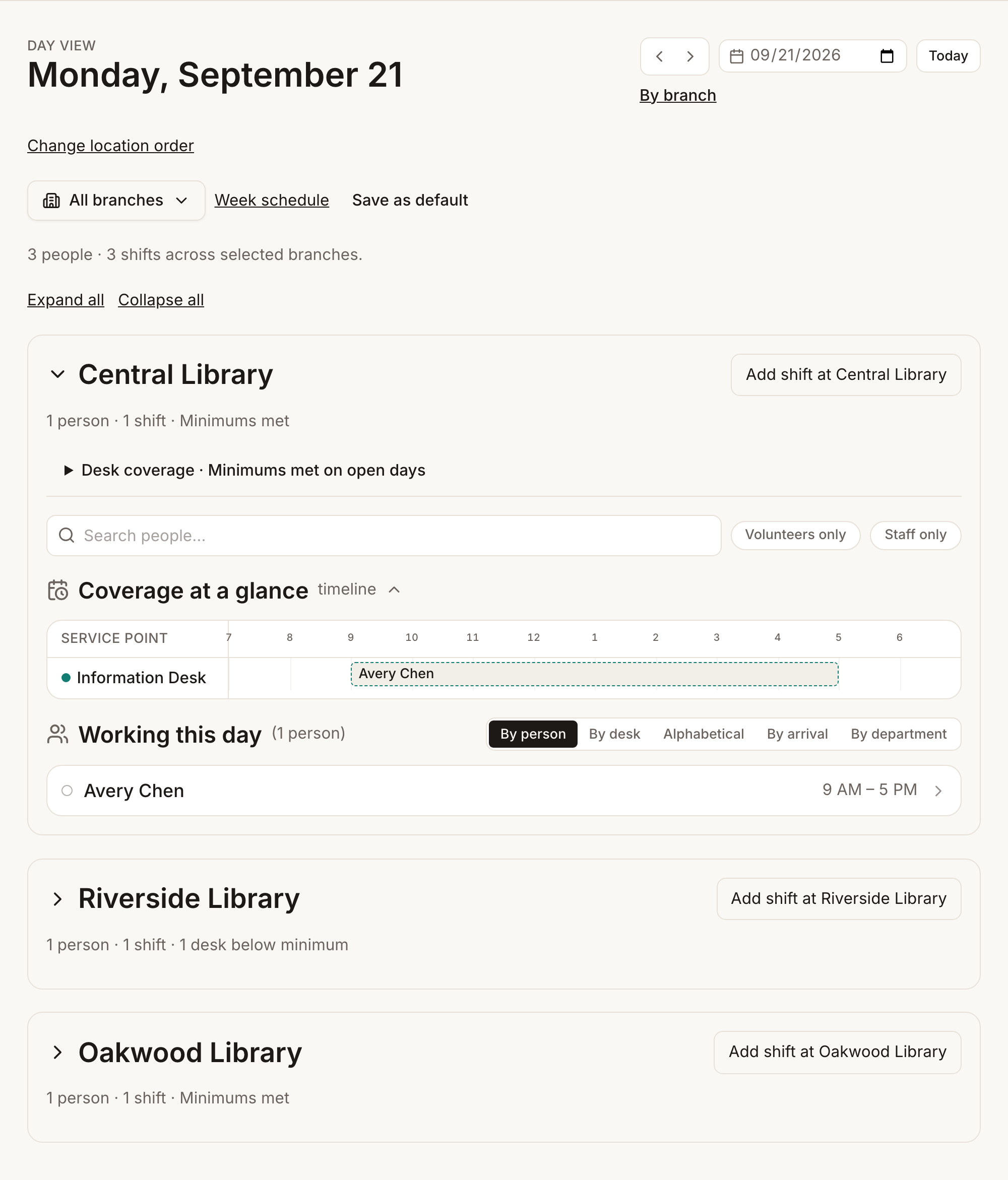
A real upgrade from the desktop days.
If your current tool only lets staff lookat the schedule online, here's what changes.
Up and running this afternoon.
Four steps from a blank page to a live schedule your whole team can see.
- 1
Add your people
Paste in your roster of staff and volunteers, or add people one at a time. Invite a few admins so you're not the only one who can edit.
- 2
Set your service points
Name the desks and jobs your library actually runs: Info Desk, Shelving, Outreach. Mark which ones need coverage during open hours.
- 3
Build the week once
Lay out your recurring shifts. They repeat on their own and skip the days you're closed, so you never retype the schedule.
- 4
Everyone sees today, live
Staff and volunteers open today's board on any phone or browser. Update it from anywhere, and everyone sees the change right away.
Customer story
How Mammen Family Public Library got hours of scheduling time back.
“For ongoing changes, it used to take me 10–15 minutes for a single shift change. Now it takes me 2. Having people able to claim shifts is amazing.”
“If I have to look at something every day, I want it to be nice to look at!! I thought the interface of Schedule3W was annoying, but now I realize that the way it looked made me dread opening it. I never feel that way with Kickstool! Sometimes I open it just to show it off to other people.”
Priced by the size of the community you serve.
Not your staff count. No per-seat math and no surprise bill as your volunteer list grows. Pilot it free for 30 days, then pay one annual price with unlimited staff and branches.
Look up your library on the pricing page to see its exact price.
- No per-seat charges, volunteers included
- Recurring shifts that skip closures
- Time off, coverage & notifications
- Grant-ready reports
- Works on any phone or browser
- Export all your data, anytime
Questions directors actually ask.
- We're not a technical team. Is it hard to set up?
- No. A guided setup walks you through adding your people and service points, and you can paste in your existing roster to start. You can have a real week scheduled the same afternoon.
- Will my staff and volunteers be able to figure it out?
- Yes. They open a link, see their own schedule, and can sync it to their phone's calendar. They can also log in to check their shifts, request time off, or change their email preferences. No training, no manual. Volunteers who will never log in don't need an account at all.
- Can I really edit the schedule from my phone?
- Yes. It's a true web app, not a desktop program with a read-only website bolted on. Most people still build the schedule at a desk and use the phone for quick changes on the go. Either way, staff see the change right away.
- Can people see the schedule without logging in?
- Yes, two ways. Each person can subscribe to their own shifts in Google, Outlook, or Apple Calendar: they sign in once to copy their personal calendar link, and from then on their shifts stay up to date on their phone. You can also share one read-only link to the whole schedule, branded, printable, and shareable by QR code, for the staff-room board or a partner organization. Anyone with that link can view it without an account. You can replace either link anytime.
- Can volunteers use it, and do they cost extra?
- Volunteers are scheduled exactly like staff and never count as a paid seat. Each one can have their own login for self-service or be scheduled without ever logging in. Your call, person by person.
- What happens to our recurring schedule?
- You build it once and it repeats automatically. It skips the days you mark as closed, and any single shift can be edited as a one-off.
- Does it build the schedule for me automatically?
- No, and that's deliberate: there's no black-box auto-scheduler, because most libraries want a person deciding who's where. Kickstool makes that person fast instead. Recurring patterns build the week, every uncovered desk hour becomes a button that opens a pre-filled shift form, and the people list puts whoever is free and trained for that window first. You make the calls; Kickstool does the cross-referencing. To move a shift directly, drag it onto someone else's row in Day view.
- Does it track hours worked or run payroll?
- No. Kickstool builds the schedule and exports scheduled hours per person, which you can pair with your existing payroll or time-clock system. It isn't a punch clock, on purpose: staying focused on scheduling is what keeps it simple.
- Can we get volunteer hours for grant and board reports?
- Yes. Export volunteer hours, staff hours, hours by assignment type, and PTO used to CSV whenever you need them. Those are the totals grant applications and boards keep asking for.
- We have more than one branch. Does that work?
- Yes. All your locations live in one account, each with its own opening hours and schedule. Managers can edit the branches they run and view the others to coordinate shared staff. Filter to one branch or see them all together.
- How do we keep desk time fair across staff?
- The libraries that don't argue about this do two things: write the expectations down, and make the totals visible. Kickstool does both. Write your desk rules in settings, like no more than 2 hours in a row at one desk, and the schedule warns whoever is drafting when a shift breaks one. It warns; it never blocks a save. And the desk-time balance report shows each person's desk and off-desk hours against what's expected, so fairness is something you can point at, not something one person remembers.
- What if we decide to leave?
- Export all of your data anytime. There's no lock-in. Your data is backed up automatically, and it belongs to your library, not to us.
Not ready for software? Start with the free schedule template.
Wrestling with desk-time fairness? See how libraries decide off-desk time.
The schedule can stop living in your head today.
Set up your library this afternoon. Pilot it free, schedule a real week, and let Kickstool handle the cross-referencing from here.
Free 30-day pilot, no credit card. Set up this afternoon.